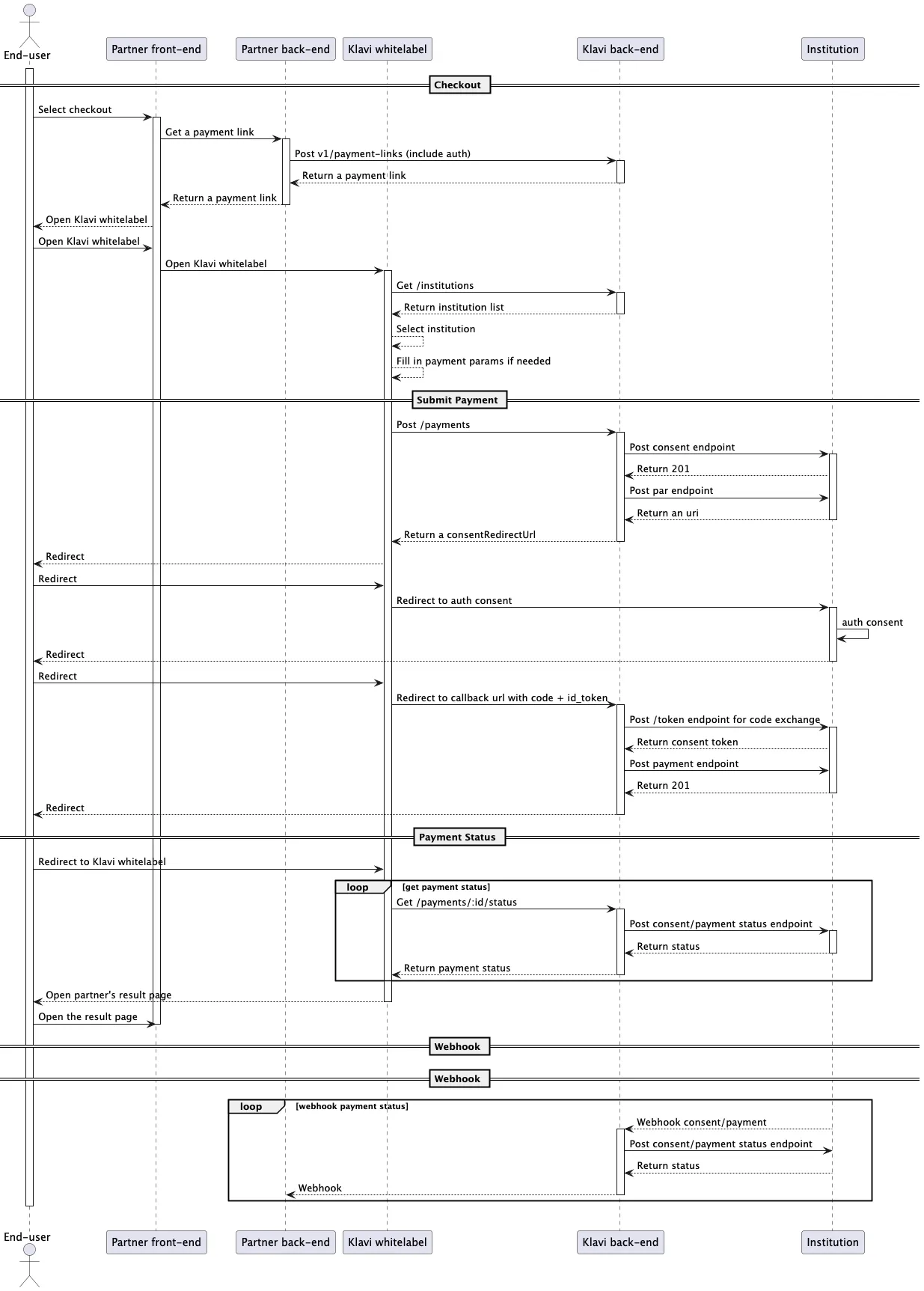
Intergration whit whitelabel
Whitelabel application customization
Klavi payment whitelabel application support certain customization, such as font and its size, page style, title and other information. please reach out to us at [email protected].
Get a starting payment url of instant
First of all, you need to get a starting adapter url by calling /payment/customer/v1/instant/payment-links. Then use this adapter url to redirect the user to input payment data, and to checkout at last.
NOTE: You should always call /payment/customer/v1/instant/payment-links on your backend service for security reasons.
Curl request example:
curl --location 'https://api-sandbox.klavi.ai/payment/customer/v1/instant/payment-links' \
--header 'Content-Type: application/json' \
--header 'Accept: application/json' \
--header 'Authorization: Bearer null' \
--data '{
    "accessKey": "8db39152-428d-11f0-b712-46c9ef66b111",
    "secretKey": "6abe2470-7c27-482e-b515-2623e9cd3c98",
    "payment":
    {
        "institutionId": "c8f0bf49-4744-4933-8960-7add6e590841",
        "clientRequestId": "1",
        "customer":
        {
            "identifierType": "CPF",
            "identifier": "76109277673",
            "name": "Klavi Test"
        },
        "date": "2025-07-02",
        "initType": "PIX_MANU",
        "amount": "1333.00",
        "currency": "BRL",
        "redirectUrl": "http://test",
        "creditorAccount":
        {
            "ispb": "87654321",
            "issuer": "1234",
            "number": "12345678",
            "accountType": "CACC",
            "holder":
            {
                "identifier": "44471172000119",
                "name": "Klavi",
                "identifierType": "CNPJ"
            }
        },
        "clientMetadata":
        {
            "os": "MACOS",
            "osVersion": "3.2.1",
            "platform": "BROWSER"
        }
    }
}'
Response example:
{
    "id": "fcb72e3a-b346-4f71-b044-971dc23232c9",
    "paymentURL":"https://api-sandbox.klavi.ai/?v=rvgvVVDDOYIR81gywJx9h1kBK55",
}
Redirect user to payment url
Once you receive response from /payment-links, redirect the user to paymentURL. The user can complete the payment initiation flow on Klavi front page.
Redirect user back to redirect url
User inputs payment data and checkouts on Klavi front page. The front page loops to get status of payment initiation.
Once the front page receives the status of successful payment initiation, it redirects the user to the paymentURL which was sent in the /payment-links request. Once receives the status of error payment initiation, it redirects user to the paymentURL.
Check the status of the payment initiation
Once your system redirects user to adapterURL, the user completes the payment initiation flow totally in Klavi front page environment.
But your system can check the status of the payment initiation by looping to call /payments/:id/status every few seconds. The id property was included in the response at /payment-links endpoint.
In order for your system to better track user payment initiation, the externalId proprety is advised in the request payload at /payment-links endpoint.
API Call Sequence Diagram